asp.net core를 활용하여 모바일 게임 만들기 (3일차)
하나의 Controller 안에 여러개의 Action
이번에는 서버 시간 데이터를 보내는 DTO를 만들어 보겠습니다.
namespace GameServer.Contracts
{
    public class ServerTimeResponse
    {
        public DateTimeOffset ServerTimeUtc { get; init; }
    }
}
다음처럼 ServerTimeResponse 클래스를 만들고 프로퍼티를 추가해줍니다.
그리고 이 DTO에 있는 서버시간을 클라이언트에게 넘겨주기 위해 Controller 안에 Action을 하나 더 만들겠습니다.
using GameServer.Contracts;
using Microsoft.AspNetCore.Mvc;
// asp.net core의 기능들을 쓰기 위한 using (예:ApiController, Route 등)

namespace GameServer.Controllers;

[ApiController]
// asp.net core에게 이 클래스가 API 요청을 처리하는 Controller임을 알려주기 위한 용도
[Route("api/server")]
// 기본 경로 설정
public sealed class ServerController : ControllerBase
{
    [HttpGet("ping")]
    // GET 요청으로 ping 경로 처리
    // 위에 Route와 합쳐서 api/server/ping 경로가 됨
    public ActionResult<ServerStatusResponse> Ping() // 메소드로 브라우저에서 api/server/ping을 호출하면 이 메소드가 호출됨
    {
        var response = new ServerStatusResponse
        {
            Message = "정상작동",
            ServerTimeUtc = DateTimeOffset.UtcNow
        };
        // 서버가 응답할 객체를 생성함

        return Ok(response);
        // Ok는 HTTP 상태 코드 200을 반환함
        // asp.net core가 response 객체를 JSON으로 변환해줌
    }

    [HttpGet("time")]
    public ActionResult<ServerTimeResponse> GetTime()
    {
        var response = new ServerTimeResponse
        {
            ServerTimeUtc = DateTimeOffset.UtcNow
        };

        return Ok(response);
    }
}
이러면 이전에 api/server/ping 경로로는 메세지와 현재 utc 시간을 넘겨줬다면, api/server/time 경로로는 utc 시간만 넘기게 할 수 있습니다.
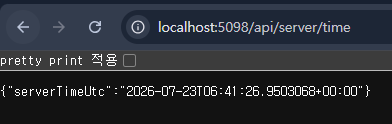
잘 반환되네요.
Route Parameter
그러면 이제 Route Parameter를 알아보도록 하겠습니다.
- api/players/1
- api/players/2
- api/players/3
처럼 맨 뒤에 플레이어 ID를 매겨변수로 넘겨 플레이어를 조회할 수 있는데 이를 Route Parameter라고 합니다.
Route Parameter를 쓰면 URL 일부를 매개변수로 넘길 수 있기 때문에 조회 같은 기능을 쓸 수 있습니다.
그러면 플레이어 응답 DTO를 먼저 만들어보겠습니다.
namespace GameServer.Contracts
{
    public class PlayerSummaryResponse
    {
        public int PlayerId { get; init; }
        public string Nickname { get; init; } = string.Empty;
        public int Level { get; init; }
    }
}
간단하게 PlayerId와 Nickname, Level을 가지고 있는 DTO로 만들겠습니다.
그 후, PlayersController를 만들어서 Player 관련 요청을 처리하도록 하겠습니다.
using GameServer.Contracts;
using Microsoft.AspNetCore.Mvc;

namespace GameServer.Controllers;

[ApiController]
[Route("api/players")]
public class PlayersController : ControllerBase
{
    // 일단 플레이어 조회를 위해 배열 제작
    private static readonly PlayerSummaryResponse[] Players =
    {
        new PlayerSummaryResponse
        {
            PlayerId = 1,
            Nickname = "PlayerOne",
            Level = 5
        },
        new PlayerSummaryResponse
        {
            PlayerId = 2,
            Nickname = "PlayerTwo",
            Level = 12
        },
        new PlayerSummaryResponse
        {
            PlayerId = 3,
            Nickname = "PlayerThree",
            Level = 8
        }
    };

    // [HttpGet("{playerId}")]은 api/players/1처럼 URL에 playerId 정보가 오면 GetById에 매개변수로 넘기는 역할입니다.
    [HttpGet("{playerId}")]
    public ActionResult<PlayerSummaryResponse> GetById([FromRoute] int playerId)
    {
        PlayerSummaryResponse? player = Array.Find(Players, player => player.PlayerId == playerId);

        return Ok(player);
    }

    // [FromRoute]는 asp.net core에게 playerId 값을 URL에서 가져오라고 지시하는 어트리뷰트입니다.

}
이제 실행을 해보면
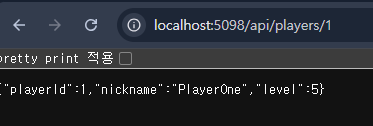
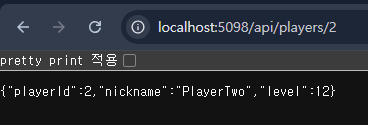
경로에 따라서 플레이어 정보가 제대로 나오는걸 볼 수 있습니다.
오류 응답 DTO
그런데 만약 URL에 999를 넣는다고 하면 999번 플레이어는 없기 때문에 플레이어는 못찾는데 코드에서는 Ok로 player를 반환하기 때문에 실제 게임이라면 문제가 생길 수 있습니다.
그래서 플레이어를 찾지 못했다면 오류를 반환해줘야 합니다.
| 상태 코드 | 의미 | 상황 |
| 200 Ok | 요청 성공 | 해당 플레이어를 찾음 |
| 400 Bad Request | 요청값이 잘못됨 | Id가 1보다 작음 |
| 404 Not Found | 대상을 못찾음 | 해당 Id를 가진 플레이어가 없음 |
그러면 이제 오류 응답 DTO를 만들어 보겠습니다.
namespace GameServer.Contracts
{
    public class ApiErrorResponse
    {
        public string Code { get; init; } = string.Empty;
        public string Message { get; init; } = string.Empty;
    }
}
ApiErrorResponse를 만든 뒤에 프로퍼티를 추가해줍니다.
Code는 어떤 에러인지 프로그램이 확인하기 위한 용도이고, Message는 개발자나 사용자에게 어떤 에러인지 알려주기 위한 용도입니다.
using GameServer.Contracts;
using Microsoft.AspNetCore.Mvc;

namespace GameServer.Controllers;

[ApiController]
[Route("api/players")]
public class PlayersController : ControllerBase
{
    // 일단 플레이어 조회를 위해 배열 제작
    private static readonly PlayerSummaryResponse[] Players =
    {
        new PlayerSummaryResponse
        {
            PlayerId = 1,
            Nickname = "PlayerOne",
            Level = 5
        },
        new PlayerSummaryResponse
        {
            PlayerId = 2,
            Nickname = "PlayerTwo",
            Level = 12
        },
        new PlayerSummaryResponse
        {
            PlayerId = 3,
            Nickname = "PlayerThree",
            Level = 8
        }
    };

    // [HttpGet("{playerId}")]은 api/players/1처럼 URL에 playerId 정보가 오면 GetById에 매개변수로 넘기는 역할입니다.
    [HttpGet("{playerId}")]
    public ActionResult<PlayerSummaryResponse> GetById(
       [FromRoute] int playerId)
    {
        if (playerId <= 0)
        {
            var error = new ApiErrorResponse
            {
                Code = "INVALID_PLAYER_ID",
                Message = "플레이어 ID는 1 이상이어야 합니다."
            };

            return BadRequest(error);
        }

        PlayerSummaryResponse? player =
            Array.Find(Players, player => player.PlayerId == playerId);

        if (player is null)
        {
            var error = new ApiErrorResponse
            {
                Code = "PLAYER_NOT_FOUND",
                Message = "플레이어를 찾을 수 없습니다."
            };

            return NotFound(error);
        }

        return Ok(player);
    }

    // [FromRoute]는 asp.net core에게 playerId 값을 URL에서 가져오라고 지시하는 어트리뷰트입니다.

}
그리고 PlayersController를 수정해줍니다.
예외 처리가 추가되어 플레이어 아이디가 1보다 작을때는 BadRequest를 리턴하고, 플레이어를 찾을 수 없을때는 NotFound를 리턴하여 잘못된 요청이 들어와도 처리가 되도록 수정했습니다.
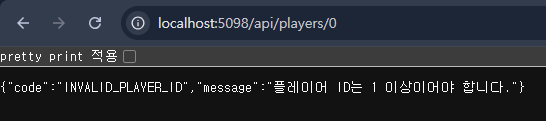
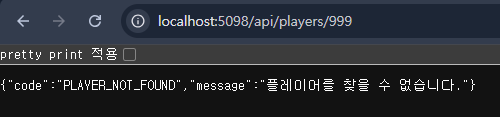
잘못된 요청이 들어와도 정상적으로 메세지가 나옵니다.
GET 방식과 POST 방식
지금까지 사용했던 요청 방식은 모두 GET 방식이였습니다.
하지만 POST 방식도 있는데 둘이 각각 뭘까요?
GET 방식은 서버의 데이터를 조회할 때 사용하는 방식으로 아까 만들었던 Route Parameter를 이용한 플레이어 데이터 조회도 GET 방식입니다.
POST 방식은 클라이언트가 서버에게 데이터를 보내 새로운 처리를 할 때 사용하는 방식으로 예를 들면 새로운 플레이어를 생성할 때는 POST 방식을 사용합니다.
내일은 POST 방식을 써서 서버에게 요청 보내는걸 만들어보겠습니다.