게임엔진/유니티
[게임엔진/유니티] 배운내용 정리2
susot
2025. 3. 24. 22:25
의존을 끊기전에 먼저 의존관계를 파악하기 위해 간단한 예제코드를 쓰겠습니다.
using UnityEngine;

public class AreaCalculator
{
    public float GetRectAngleArea(Rectangle rect)
    {
        return rect.width * rect.height;
    }

    public float GetCircleArea(Circle circle)
    {
        return circle.radius * circle.radius * Mathf.PI;
    }
}


public class Rectangle
{
    public float width, height;
}

public class Circle
{
    public float radius;
}
만약 이 코드처럼 도형에 크기를 계산해주는 코드를 만들었다고 가정해보겠습니다.
겉으로 보면 문제가 없어 보이지만 의존관계를 다이어그램으로 보면 문제가 보입니다.
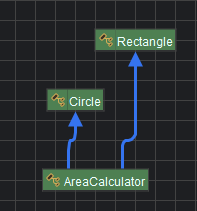
AreaCalculator가 각각에 도형에 의존하고 있는 모습입니다. 이는 도형이 증가하면 증가할수록
AreaCalculator를 수정해야됩니다. 이를 추상클래스로 의존을 끊어보도록 하겠습니다.
using UnityEngine;

public class AreaCalculator
{
    public float GetArea(Shape shape)
    {
        return shape.CalculateArea();
    }
}


public class Rectangle : Shape
{
    public float width, height;
    public override float CalculateArea()
    {
        return width * height;
    }
}

public class Circle : Shape
{
    public float radius;
    public override float CalculateArea()
    {
        return radius * radius * Mathf.PI;
    }
}

public abstract class Shape
{
    public abstract float CalculateArea();
}
지금처럼 Shape라는 추상클래스를 만들고 크기를 계산하는 추상메소드를 만든뒤 각각에 도형이
이를 상속받아 알아서 크기를 계산합니다.
AreaCalculator는 Shpae를 받아서 계산된 크기만 반환을 해주면 됩니다.
이렇게 코드를 수정하는 의존을 많이 끊어낼 수 있습니다.
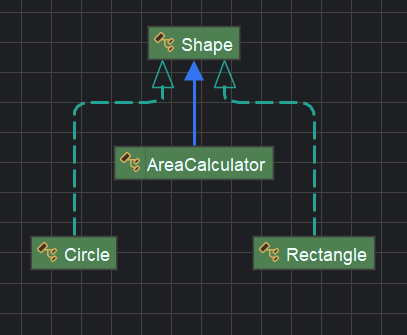
AreaCalculator는 Shpae만 의존하고 도형들을 의존하지 않으므로 도형을 추가하려해도 원래 코드를 수정할 필요가 없어집니다.
이게 SOLID 원칙에 O에 해당하는 개방폐쇄 원칙입니다.
그러면 현재 플레이어 코드도 지금처럼 바꿔보도록 하겠습니다.
using UnityEngine;

public abstract class Entity : MonoBehaviour
{

}
public interface IEntityComponent
{
    public void Initialize(Entity entity);
}
다음같이 만들어줬다면 Entity코드를 수정해줍니다.
using System;
using System.Collections.Generic;
using System.Linq;
using UnityEngine;

public class Entity : MonoBehaviour
{
    protected Dictionary<Type, IEntityComponent> _components;

    public virtual void Awake()
    {
        _components = new Dictionary<Type, IEntityComponent>();
        AddComponents();
        InitializeComponent();
    }

    protected virtual void InitializeComponent()
    {
        _components.Values.ToList().ForEach(component => component.Initialize(this));
    }

    protected virtual void AddComponents() => GetComponentsInChildren<IEntityComponent>().ToList()
        .ForEach(component => _components.Add(component.GetType(), component));

    //GetComponent는 MonoBehaviour에 있으므로 GetCompo를 사용한다.
    public T GetCompo<T>() where T : IEntityComponent => (T)_components.GetValueOrDefault(typeof(T));
}
using UnityEngine;

public class CharacterMovement : MonoBehaviour, IEntityComponent
{
    [SerializeField] private float moveSpeed = 8f, gravity = -9.8f, rotationSpeed = 8f; // 이동속도와 중력값 설정

    [SerializeField] private CharacterController characterController; // characterController로 움직임

    //[SerializeField] private Transform parent;
    public bool IsGround => characterController.isGrounded; // 캐릭터컨트롤러의 isGrounded를 가져와서 변수로 뺌
    private Vector3 _velocity;
    public Vector3 Velocity => _velocity;
    private float _verticalVelocity;
    private Vector3 _movementDirection;

    private Entity _entity;
    public void Initialize(Entity entity)
    {
        _entity = entity;
    }
    public void SetMovementDirection(Vector2 movementInput) // 이동할 방향을 정하는 메소드
    {
        _movementDirection = new Vector3(movementInput.x, 0f, movementInput.y).normalized;
    }

    private void FixedUpdate()
    {
        CalculateMovement();
        ApplyGravity();
        Move();
    }

    private void CalculateMovement()
    {
        _velocity = Quaternion.Euler(0, -45f, 0) * _movementDirection;
        _velocity *= moveSpeed * Time.fixedDeltaTime;

        if (_velocity.magnitude > 0f)
        {
            Quaternion targetRotation = Quaternion.LookRotation(_velocity);
            _entity.transform.rotation = Quaternion.Lerp(_entity.transform.rotation, targetRotation, rotationSpeed * Time.fixedDeltaTime);
        }
    }

    private void ApplyGravity()
    {
        if (IsGround && _verticalVelocity < 0)
        {
            _verticalVelocity = -0.03f;
        }
        else
        {
            _verticalVelocity += gravity * Time.fixedDeltaTime;
        }
        _velocity.y = _verticalVelocity;
    }

    private void Move()
    {
        characterController.Move(_velocity);
    }

}
using System;
using UnityEngine;

public class Player : Entity
{
    private CharacterMovement _movement;
    [SerializeField] private PlayerInputSO playerInput;

    public override void Awake()
    {
        base.Awake();
        _movement = GetCompo<CharacterMovement>();
        playerInput.OnMovementChange += HandleMovementChange;
    }

    private void OnDestroy()
    {
        playerInput.OnMovementChange -= HandleMovementChange;
    }

    private void HandleMovementChange(Vector2 movementInput)
    {
        _movement.SetMovementDirection(movementInput);
    }
}
이렇게 의존성을 끊어낼 수 있습니다.