[게임엔진/유니티] 배운내용 정리1
오늘은 간단한 플레이어를 만들어보겠습니다.
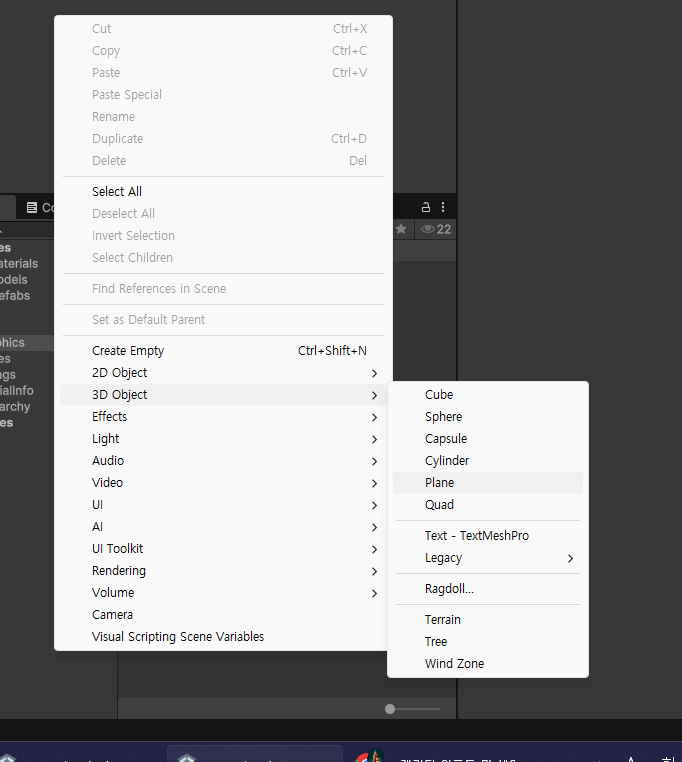
먼저 3D Object - Plane으로 바닥을 만들어줍니다.
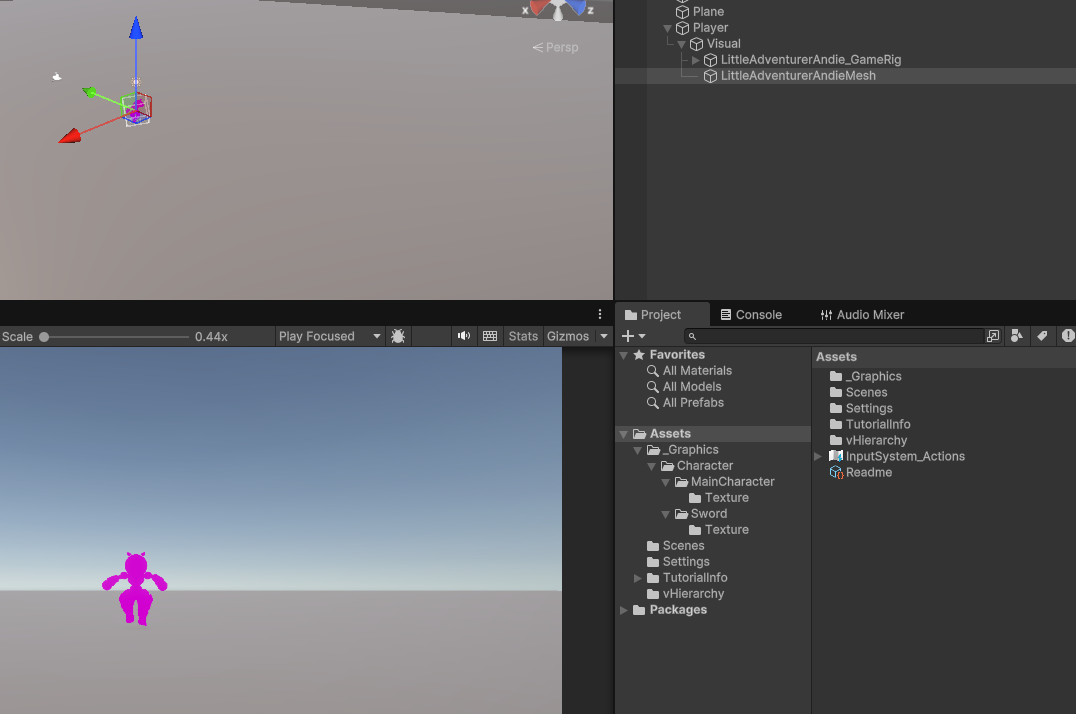
그다음 캐릭터를 만들어준뒤,
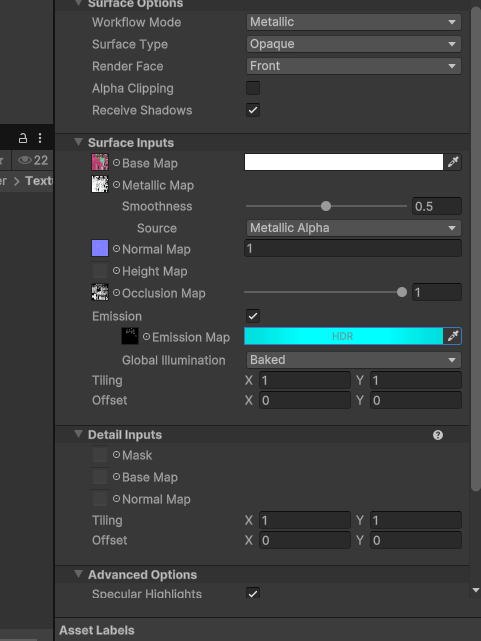
Material을 하나 만든뒤, 다음처럼 셋팅해줍니다.

그다음, Player안에 Character Controller를 붙여줍니다.
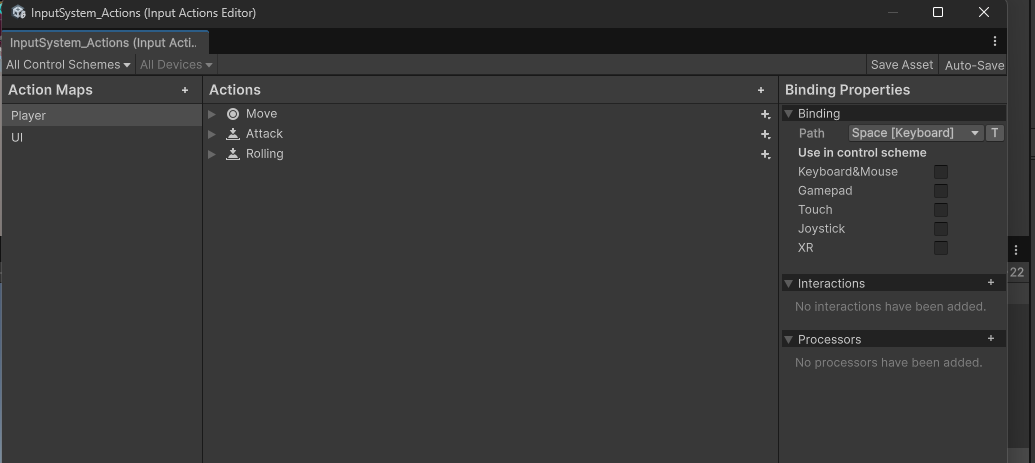
InputMap을 하나 만들어서 다음처럼 셋팅해줍니다.
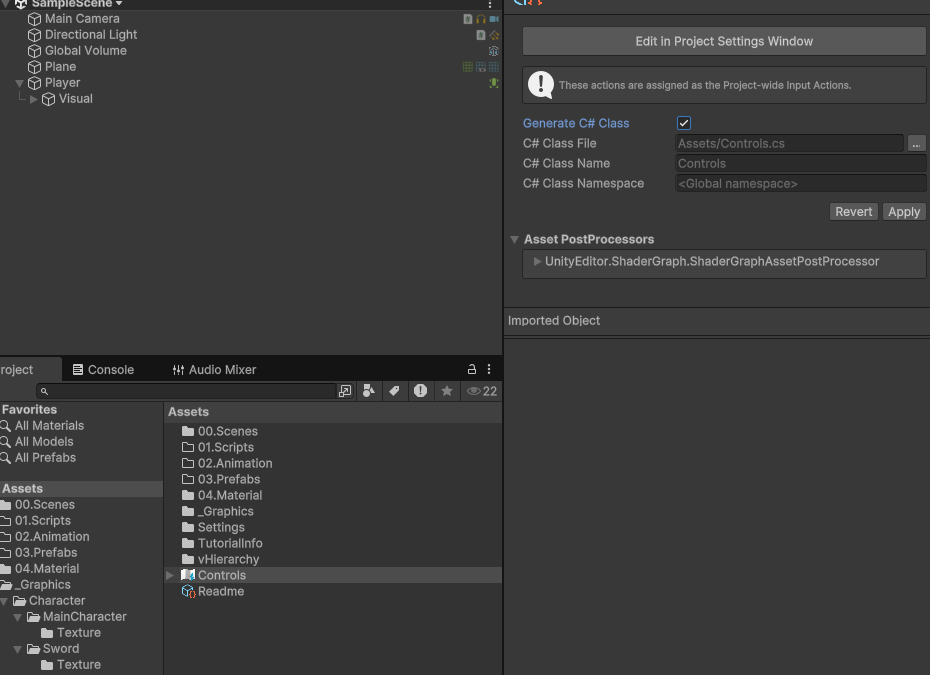
그다음 Generate C# Class를 체크하고 Apply를 눌러 C# 클래스를 만들어줍니다.
그다음 카메라 셋팅을 해주겠습니다.
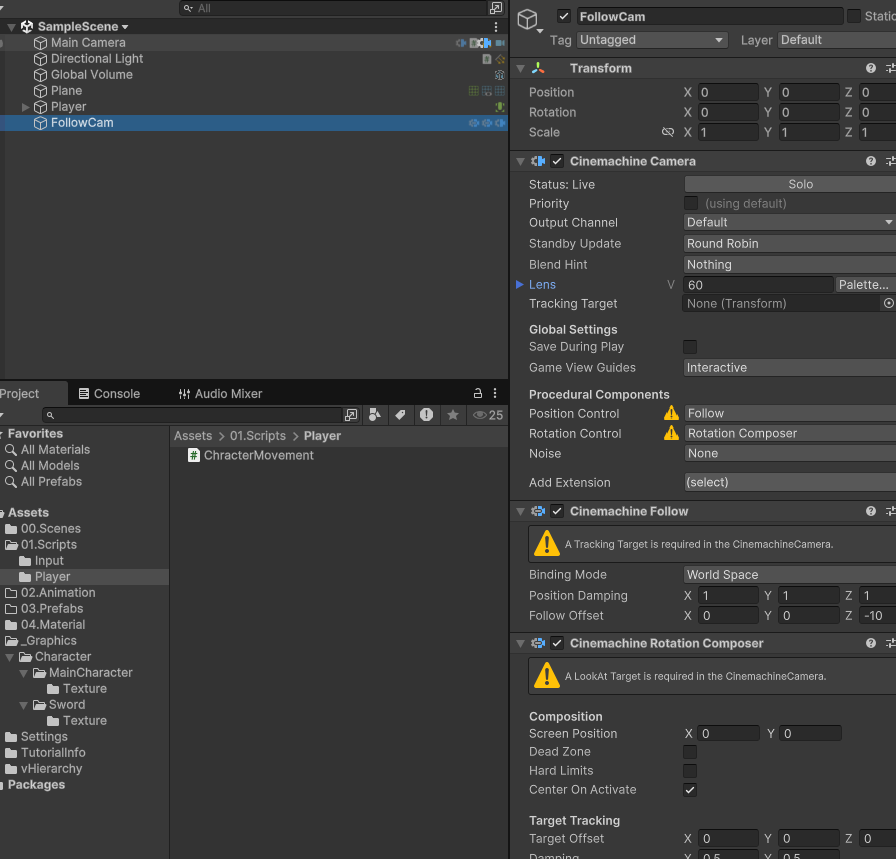
Cinemachine을 임포트한뒤, Follow Camera를 추가합니다.
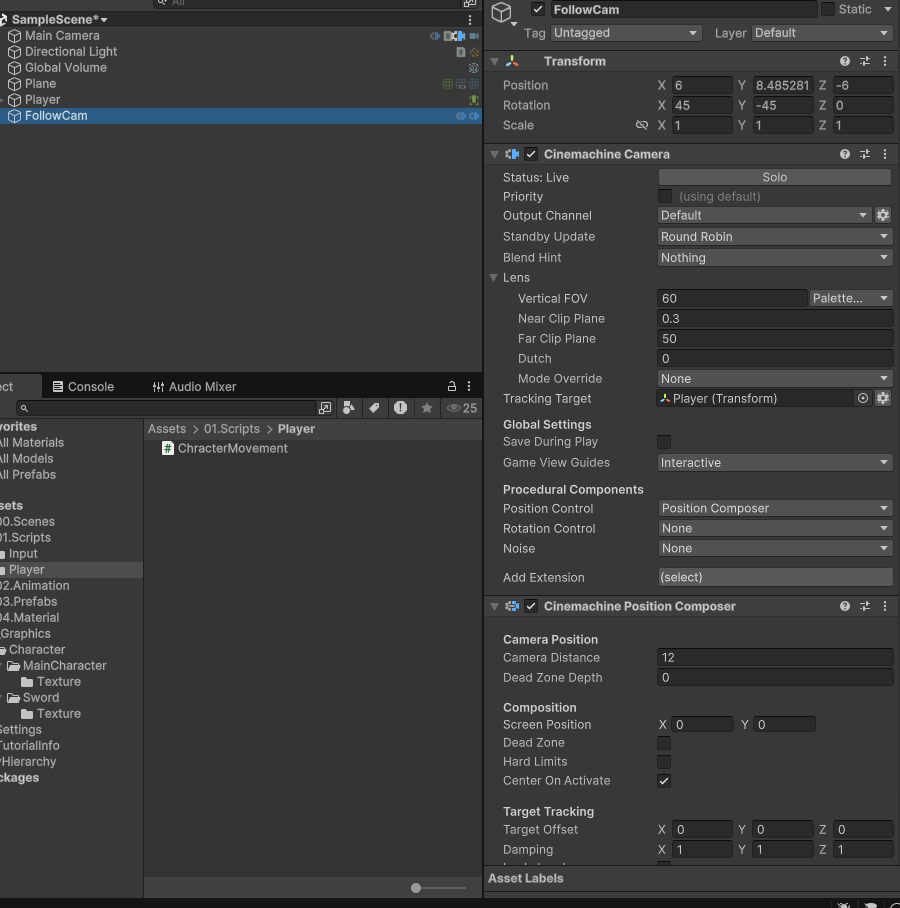
그다음 다음과 같이 셋팅하면 됩니다.
이러면 기본 셋팅은 끝납니다. 이제 캐릭터 이동을 해보겠습니다.
using System;
using UnityEngine;
using UnityEngine.InputSystem;

[CreateAssetMenu(fileName = "PlayerInputSO", menuName = "SO/PlayerInput")]
public class PlayerInputSO : ScriptableObject, Controls.IPlayerActions
{
    public event Action<Vector2> OnMovementChange;
    public event Action OnAttackPressed;
    public event Action OnRollingPressed;

    private Controls _controls;

    private void OnEnable()
    {
        if (_controls == null)
        {
            _controls = new Controls();
            _controls.Player.SetCallbacks(this);
        }
        _controls.Player.Enable();
    }

    private void OnDisable()
    {
        _controls.Player.Disable();
    }

    public void OnMove(InputAction.CallbackContext context)
    {
        Vector2 movementKey = context.ReadValue<Vector2>();
        OnMovementChange?.Invoke(movementKey);
    }

    public void OnAttack(InputAction.CallbackContext context)
    {
        if(context.performed)
            OnAttackPressed?.Invoke();
    }

    public void OnRolling(InputAction.CallbackContext context)
    {
        if(context.performed)
            OnRollingPressed?.Invoke();
    }
}
먼저 PlayerInputSO에서 입력을 받으면 Action을 Invoke해주는 SO를 만들어줍니다.
using UnityEngine;

public class ChracterMovement : MonoBehaviour
{
    [SerializeField] private float moveSpeed = 8f, gravity = -9.8f; // 이동속도와 중력값 설정

    [SerializeField] private CharacterController characterController; // characterController로 움직임

    public bool IsGround => characterController.isGrounded; // 캐릭터컨트롤러의 isGrounded를 가져와서 변수로 뺌
    private Vector3 _velocity;
    public Vector3 Velocity => _velocity;
    private float _verticalVelocity;
    private Vector3 _movementDirection;

    public void SetMovementDirection(Vector2 movementInput) // 이동할 방향을 정하는 메소드
    {
        _movementDirection = new Vector3(movementInput.x, 0f, movementInput.y).normalized;
    }

    private void FixedUpdate()
    {
        CalculateMovement();
        ApplyGravity();
        Move();
    }

    private void CalculateMovement()
    {
        _velocity = Quaternion.Euler(0, -45f, 0) * _movementDirection;
        _velocity *= moveSpeed * Time.fixedDeltaTime;

        if (_velocity.magnitude > 0f)
            transform.rotation = Quaternion.LookRotation(_velocity);
    }

    private void ApplyGravity()
    {
        if (IsGround && _verticalVelocity < 0)
        {
            _verticalVelocity = -0.03f;
        }
        else
        {
            _verticalVelocity += gravity * Time.fixedDeltaTime;
        }
        _velocity.y = _verticalVelocity;
    }

    private void Move()
    {
        characterController.Move(_velocity);
    }
}
그다음 캐릭터가 이동하도록 해주는 코드를 작성합니다.
그러면 이제 인풋받고 명령을 내려줄 Player 코드를 작성해보겠습니다.
이동은 잘 되지만 회전이 안됩니다. 왜냐하면 현재는 Player를 회전하는게 아니라 Movement라는 오브젝트를 회전중이기 때문입니다.
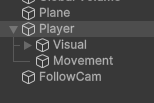
따라서 Movement에서 부모를 회전시키면 됩니다.
[SerializeField] private float moveSpeed = 8f, gravity = -9.8f; // 이동속도와 중력값 설정

    [SerializeField] private CharacterController characterController; // characterController로 움직임

    [SerializeField] private Transform parent;
    public bool IsGround => characterController.isGrounded; // 캐릭터컨트롤러의 isGrounded를 가져와서 변수로 뺌
    private Vector3 _velocity;
    public Vector3 Velocity => _velocity;
    private float _verticalVelocity;
    private Vector3 _movementDirection;

    public void SetMovementDirection(Vector2 movementInput) // 이동할 방향을 정하는 메소드
    {
        _movementDirection = new Vector3(movementInput.x, 0f, movementInput.y).normalized;
    }

    private void FixedUpdate()
    {
        CalculateMovement();
        ApplyGravity();
        Move();
    }

    private void CalculateMovement()
    {
        _velocity = Quaternion.Euler(0, -45f, 0) * _movementDirection;
        _velocity *= moveSpeed * Time.fixedDeltaTime;

        if (_velocity.magnitude > 0f)
            parent.rotation = Quaternion.LookRotation(_velocity);
    }
회전로직을 parent로 변경
이렇게 하면 잘 회전이 될겁니다. 하지만 회전이 될때 부드럽지 않고 순간이동처럼 회전되는 모습을 볼 수
있습니다.
이는 Lerp를 사용하여 해결할 수 있습니다.
private void CalculateMovement()
    {
        _velocity = Quaternion.Euler(0, -45f, 0) * _movementDirection;
        _velocity *= moveSpeed * Time.fixedDeltaTime;

        if (_velocity.magnitude > 0f)
        {
            Quaternion targetRotation = Quaternion.LookRotation(_velocity);
            parent.rotation = Quaternion.Lerp(parent.rotation, targetRotation, rotationSpeed * Time.fixedDeltaTime);
        }
    }
이처럼 Lerp를 사용한다면 부드럽게 회전하는걸 볼 수 있습니다.
지금은 코드간에 다이어그램을 그려보면
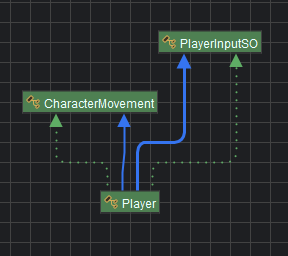
의존이 높은걸 알 수 있습니다. 따라서 다음번에는 의존을 줄이는 방식을 쓰도록 하겠습니다.